top of page

Mira Move App
App Permissions iOS
To use the “Mira Move Pause” feature, you need to allow access to Screen Time. Mira Move uses Apple’s official Screen Time feature only to automatically detect when the set limit has been reached and temporarily pause the selected apps.
Important: Mira Move does not change your Screen Time settings without your permission. This access is used only for the “Mira Move Pause” feature and to manage the apps you selected.
1. On the “Mira Move Pause” setup page, tap the “Connect” button.

2. When the Apple system window appears, tap “Continue” to allow Mira Move to access Screen Time.
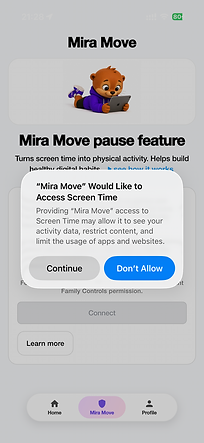
3. Confirm the action using Face ID, Touch ID, or your device passcode.

4. Done! Access has been granted. You can now continue setting up the “Mira Move Pause” feature.

bottom of page